
Help! My WordPress Admin Toolbar Is Missing!

Short one today, but trust me – it’s useful.

Have you ever logged into a WordPress site, then clicked “Visit Site” in the upper left-hand corner of your dashboard, only to find that the familiar WordPress admin bar is missing when you’re viewing pages? Specifically, that’s the toolbar you’ll see at the top of this browser shot:
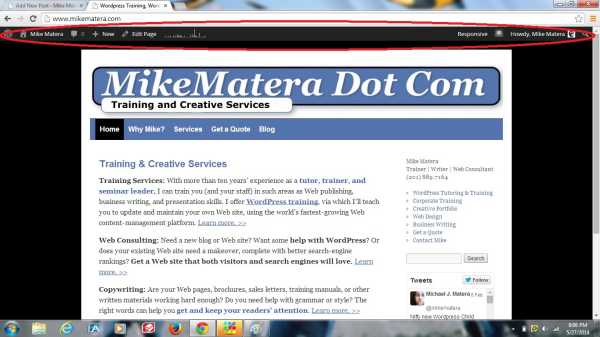
WordPress Admin Toolbar

If it’s missing, where did it go?

Just go into Users >> Your Profile, along the left-hand side of the dashboard navigation panel. In the middle of the page, you’ll see that there’s a checkbox labeled “Show toolbar when viewing site”. Make sure that box is checked, as it is in the following browser image:
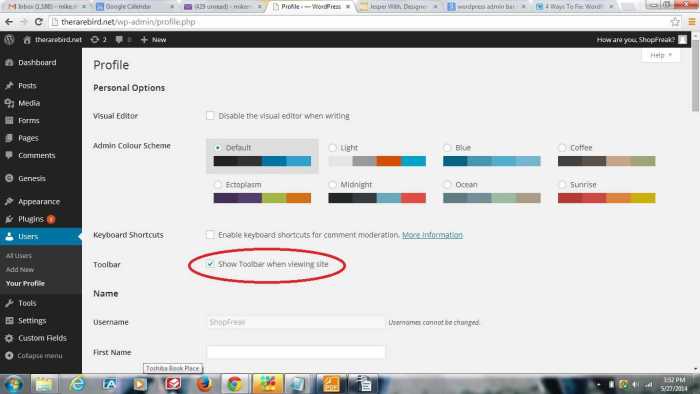
WordPress User Settings

That should fix the problem. If, however, the problem persists, you may have to reinstall WordPress (not as hard as you’d think – you can do it right from the Updates tab), or edit one of your configuration files (requires a bit of advanced knowledge).

5 responses to “Help! My WordPress Admin Toolbar Is Missing!”

  1. bw29login Avatar

    Best platform I have used in the Philippines so far. The local payment options make it so much easier to manage my account. Highly recommended. bw29login

  2. vnnohu1 Avatar

    Really loving the vibe here. Everything feels very intuitive and the bonuses are actually helpful for new players. Highly recommend vnnohu1

  3. ggplay88slotlogin Avatar

    If you love slots then this is the place to be. The graphics are stunning and the wins feel rewarding. Log in at ggplay88slotlogin and see for yourself.

  4. inzeta777 Avatar

    Love the variety of games available here. Everything loads quickly and I haven’t faced any lag during my sessions. Give inzeta777 a try, you won’t regret it.

  5. phroyalbet Avatar

    Best gaming experience I’ve had in a while. The graphics are crisp and the payouts are legit. Give phroyalbet a try!

Have Your Say!